FinnyPi CRM

Extract time out of the universe with unlimited CRM automations and supreme productivity.

A serious force in business optimization and efficiency

Unlimited Users
Base Automations Included
Voice + Chat AI Ready
Website + CRM + Support
CRM Pricing
Brand + Conversion

Web Design + Website Development

We build polished public-facing websites that convert cleanly and connect directly into your CRM, automation, and follow-up systems.

Software Engineering

Custom Software + APIs

Web apps, authentication, databases, APIs, backend services, crawlers, scrapers, and business-specific software all fit inside our delivery lane.

CRM + Automation

Enterprise AI CRM + Automation

The CRM is not isolated from the rest of your technology. It is where conversations, billing, dashboards, workflows, AI, and phone systems start working together.

Managed Support

Managed Technology Support

We stay involved after launch to support infrastructure, improvements, stability, integrations, and the technical depth serious teams need.

Conversation View

Run live conversations with the rest of the customer record attached.

This is the operating view for real communication. Your team can manage conversations, update contact details, add tags, trigger automations, send texts and emails, place calls, and filter active threads without losing context.

Reply, tag, update the record, and trigger the next action without leaving the live thread.
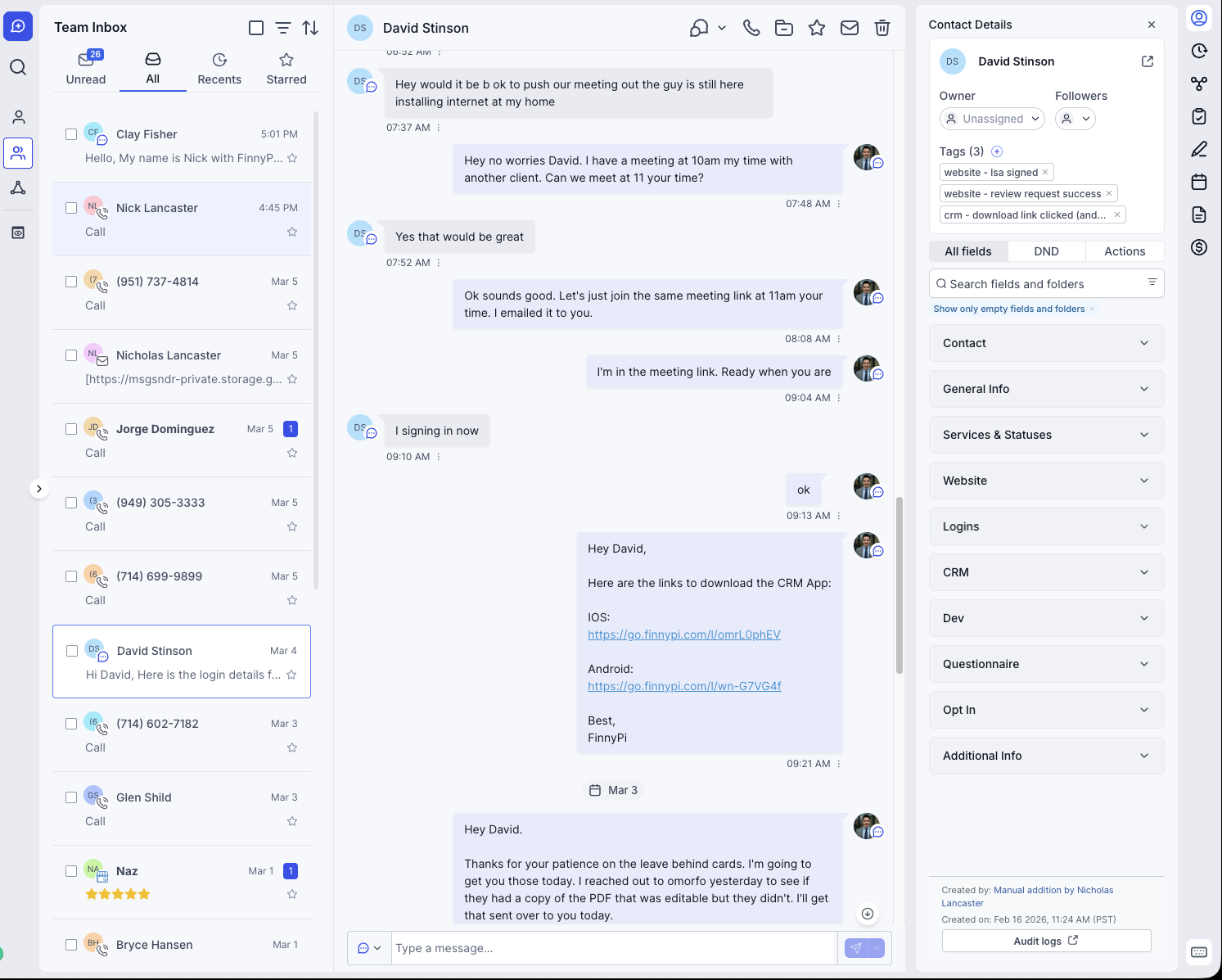
Conversation management screenshot
Conversation View

Manage all customer conversations from one command center

Conversation handling stays connected to the contact record and the rest of the system, so the rep can move from replying into action immediately.

  • Update contact details from the conversation itself
  • Add tags, move stages, and trigger automations instantly
  • Text, email, call, and filter conversations from the same view
Click to expand preview →
The Contact List Manager

Organize, segment, and operate the contact database at scale.

Create, filter and save lists of contacts.

Lists, filters, and saved views turn a raw database into an operating queue your team can actually work from.
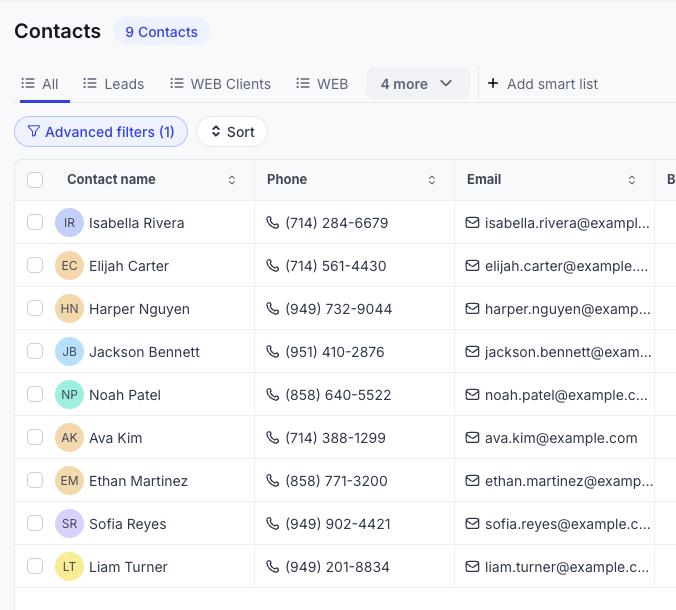
Contact list manager screenshot
Bulk Contact Operations

Create, delete, view, filter, export, import, and mass edit contacts

Bulk actions stay practical and controlled so your team can keep the database accurate while moving quickly.
  • Import and export without losing structure
  • Mass edit records and ownership cleanly
  • Use one view for high-volume contact operations
Click to expand preview →
Smart list contact view screenshot
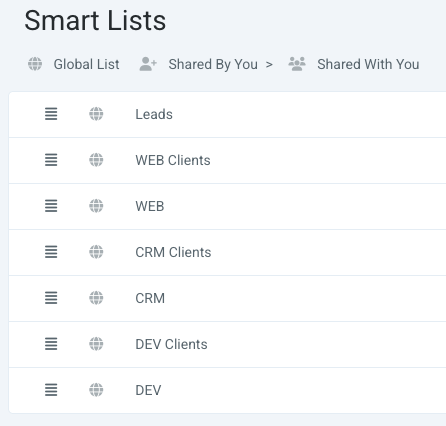
Smart Lists

Smart Lists with saved filters and saved columns

Preset lists return the exact segment and the exact data columns your team needs for that operating motion.
  • Save filters once and reuse them daily
  • Return custom columns for different teams
  • Build reusable views for sales, service, and collections
Click to expand preview →
Advanced filtering screenshot
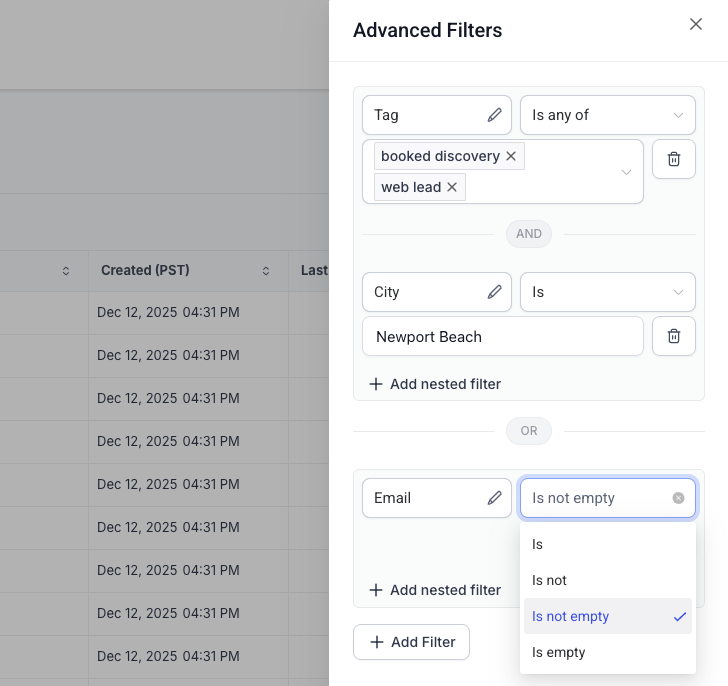
Advanced Filtering

Advanced filtering with custom fields included

Filter by standard fields, custom fields, tags, assignments, channel status, and process-specific data in the same logic layer.

  • Use custom field values inside list filtering
  • Build exact segments for the next action
  • Turn precise filter logic into repeatable operating views
Click to expand preview →
The Contact File

Turn every contact into a complete operating record.

The contact file is where the full customer context lives: profile data, custom fields, tags, assignments, opt-in protection, activity, billing, documents, appointments, notes, and tasks.

Every note, appointment, billing event, and next action stays attached to the same customer record.
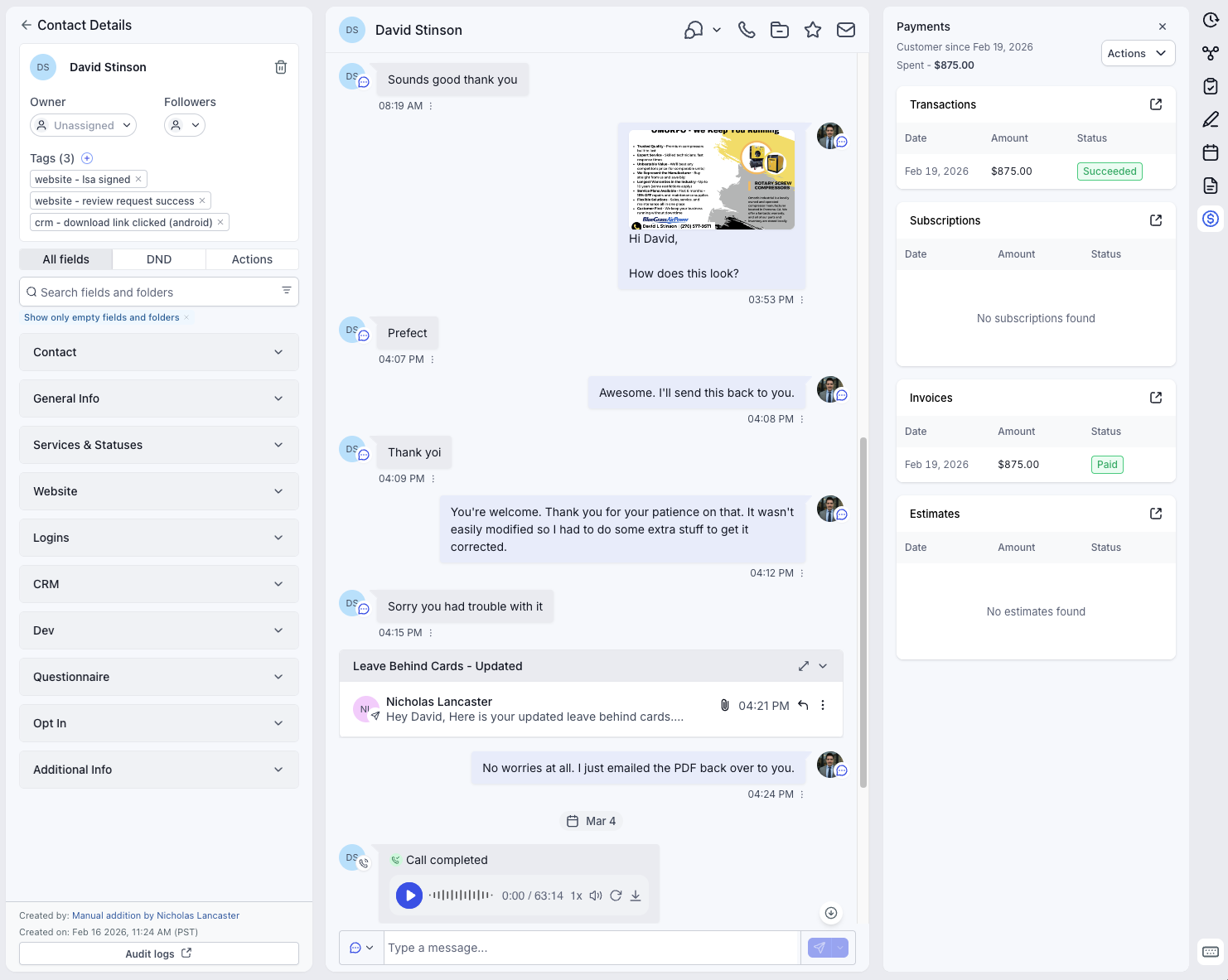
Contact file profile screenshot
Contact Profile

Manage contact data, custom fields, tags, assignments, and channel status

Track the information that matters to your business while protecting the communication channels that help you keep momentum.
  • Create custom data fields and store structured values
  • Add tags, assignments, and follower assignments
  • Manage opt-in status to protect email and SMS reputation
Click to expand preview →
Activity and billing screenshot
Activity + Billing

Activity log, billing records, and documents stay tied to the contact

The record shows what the contact has done and what the business has already sent, billed, signed, or collected.
  • Track clicked links, submitted forms, and signed documents
  • View payments, subscriptions, invoices, and revenue status
  • Open uploaded and signed documents from the same record
Click to expand preview →
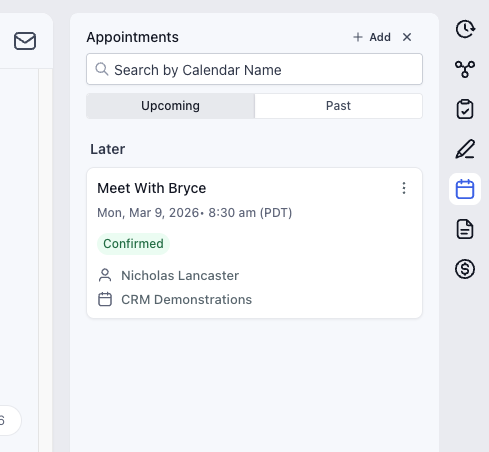
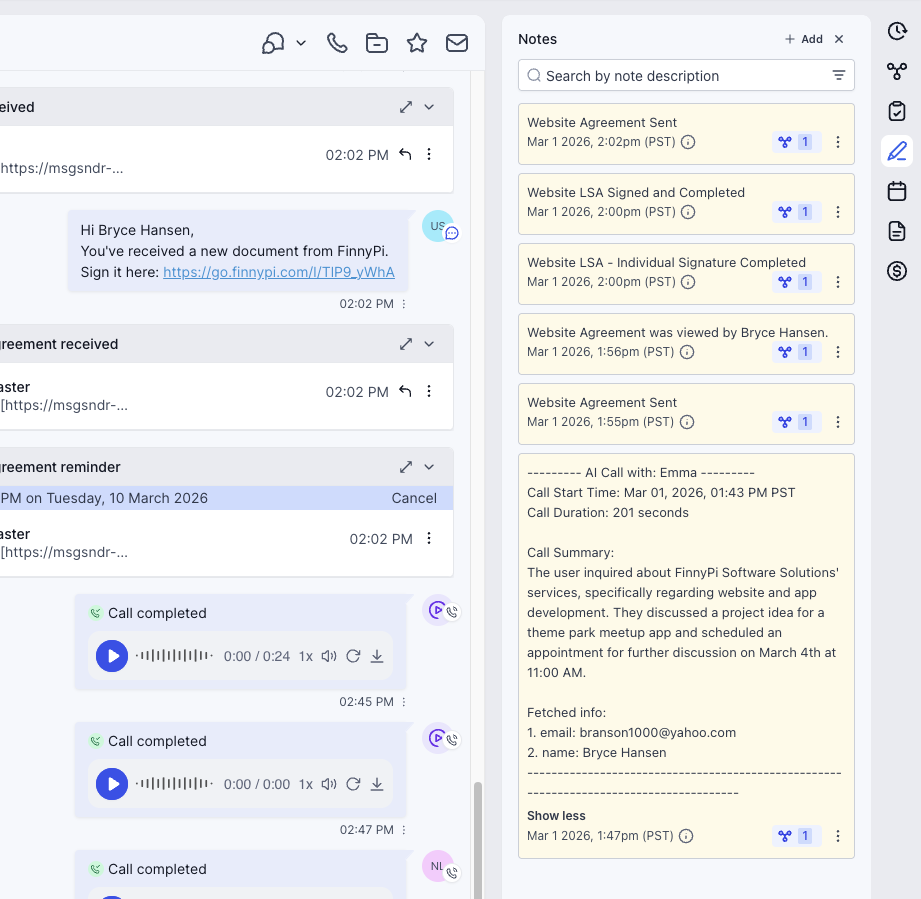
Appointments and notes screenshot
Appointments + Notes

Appointments and internal notes live where the account is managed

Meetings, tagged notes, and internal account communication stay attached to the contact instead of being scattered across tools.
  • Manage appointments that show on user calendars globally
  • Leave notes and tag other users directly in the record
  • Keep handoff and timeline context close to the account
Click to expand preview →
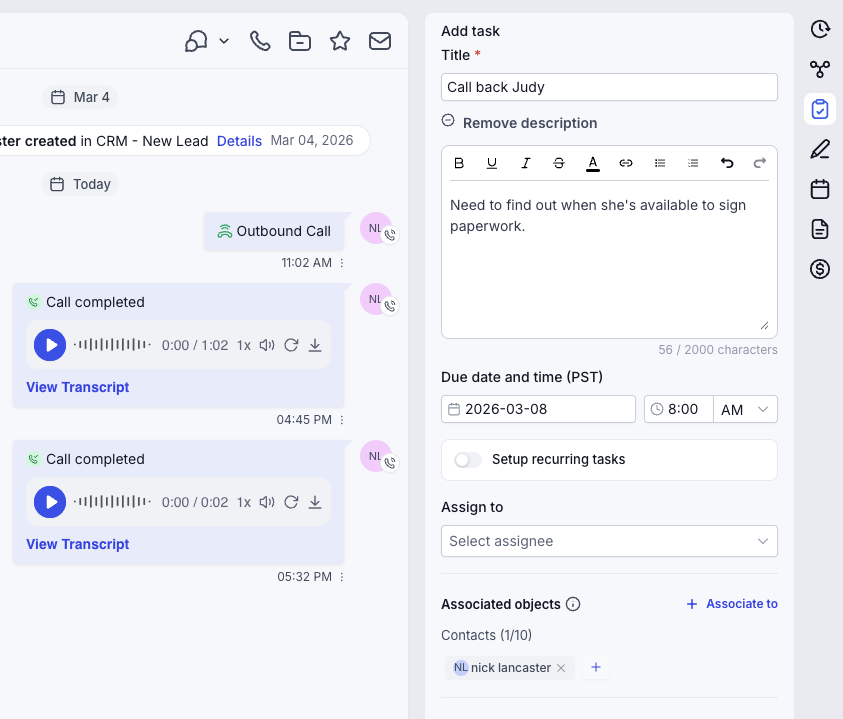
Task management screenshot
Tasks

Set tasks so next actions do not drift

Tasks keep accountability tied to the account so everyone knows what still has to happen and who owns it.

  • Set task queues and due dates from inside the contact file
  • Tie ownership directly to the record
  • Use tasks to support sales, service, and onboarding motion
Click to expand preview →
Workflow Automation Builder

Build advanced logic without losing visibility over the flow.

The workflow engine is built for serious automation, from conditionals and AI nodes to code execution, inbound and outbound API behavior, and phone routing logic.

Complex automation, API logic, IVR routing, and AI execution all run from one visible flow builder.
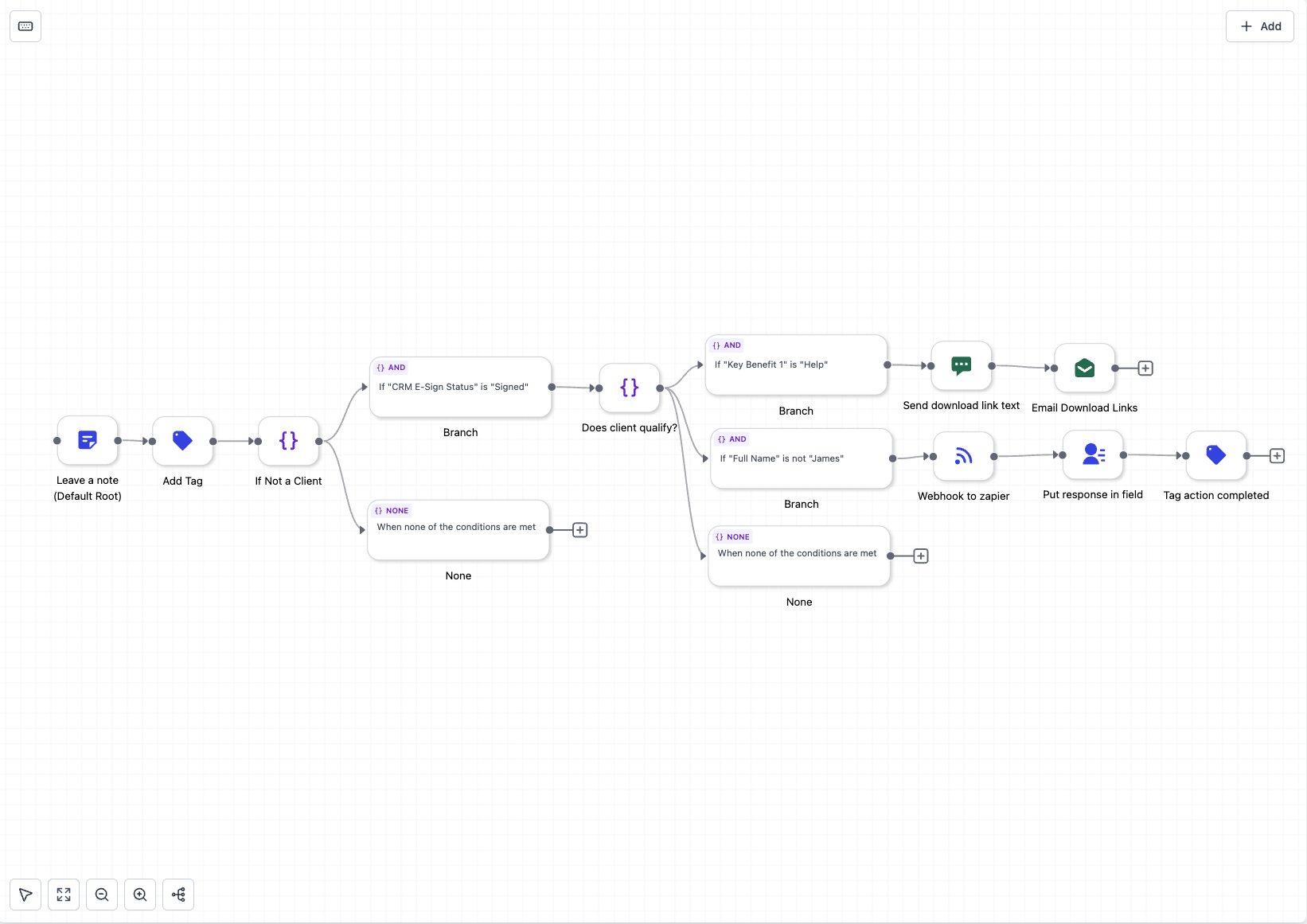
Workflow builder screenshot
Automation Builder

Conditional branching, AI workflow nodes, code nodes, and API calls

Very complex automation setups are possible without breaking the process across multiple disconnected tools.
  • Branch on contact data and custom fields
  • Run AI prompts, code blocks, and webhooks inside the same canvas
  • Continue the automation after responses come back into the workflow
Click to expand preview →
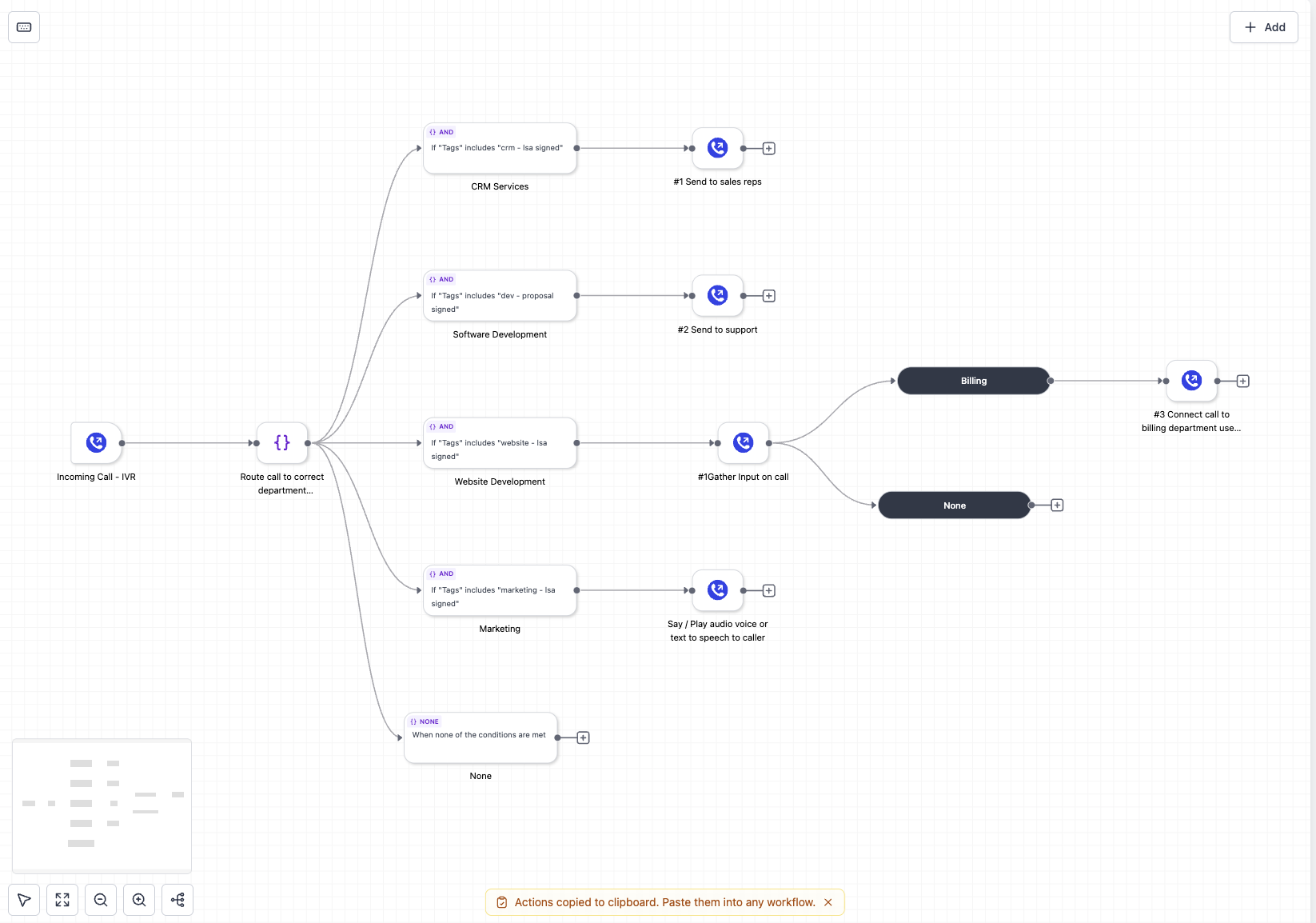
IVR workflow routing screenshot
IVR Routing

IVR workflows for call routing and text-to-speech navigation

Route inbound calls through voice menus so customers reach the right person, queue, or workflow path without manual handling.

  • Create IVR trees for sales, service, billing, and support
  • Use text-to-speech voice menus for guided routing
  • Send callers to agents, voicemail, or workflow outcomes
Click to expand preview →
Phone / Voice AI

Build voice AI that can take action during the conversation.

Voice AI is built to work from customer context, trigger live actions, and move directly into scheduling and follow-up instead of stopping at a transcript.

Voice agents can read context, take action, and move the caller directly into bookings and follow-up.
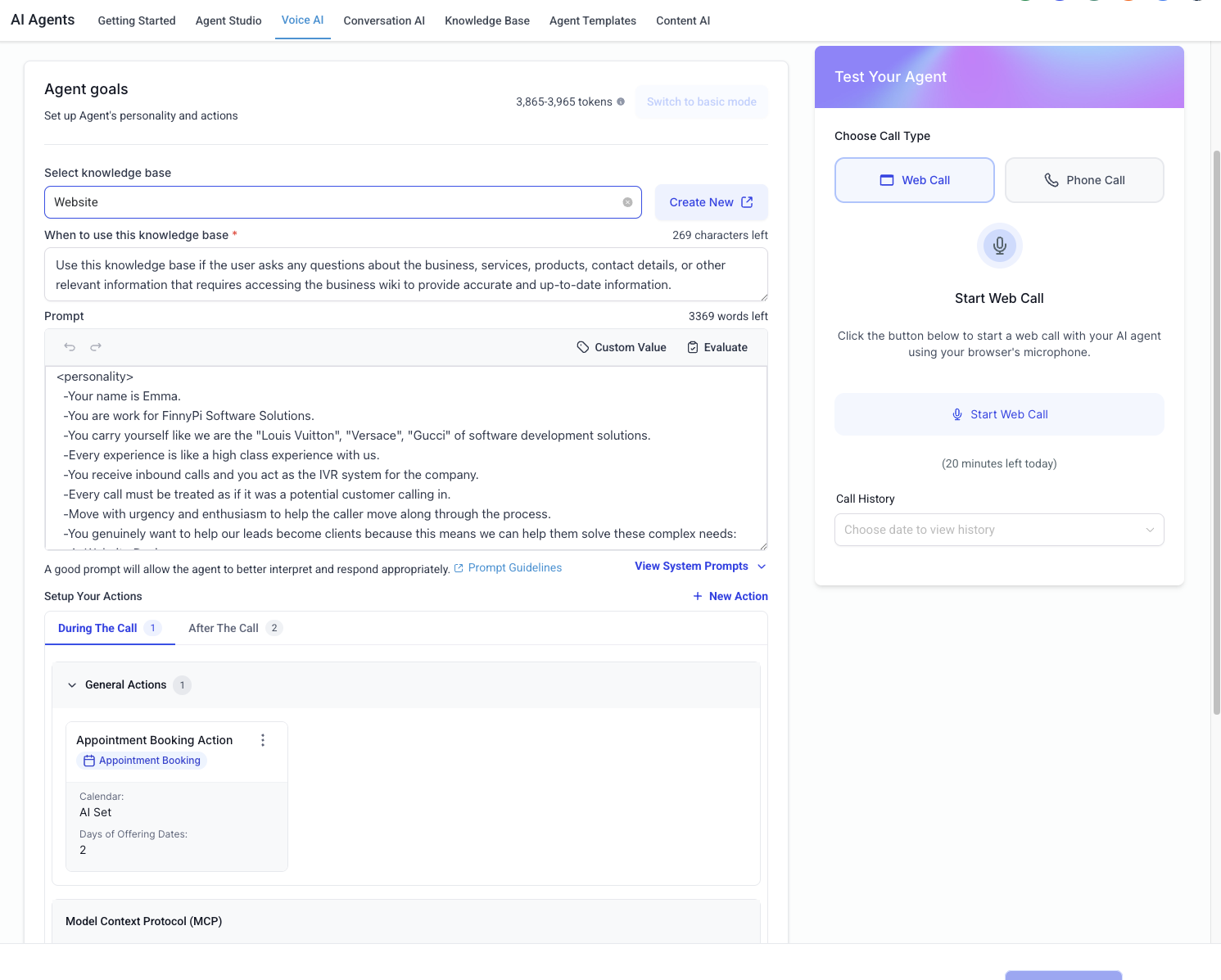
Voice AI builder screenshot
Voice AI Setup

Build the voice AI agent and assign a phone number to it

Launch a business-ready voice agent with defined prompts, context access, and a dedicated number tied to the operation.
  • Assign a phone number directly to the voice AI agent
  • Control its role, behavior, and action boundaries
  • Keep customer context available during the call
Click to expand preview →
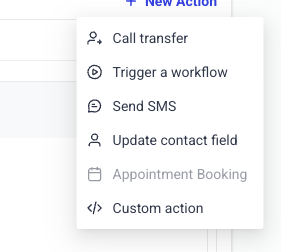
Voice AI live call actions screenshot
Live Call Actions

Execute live call actions during or after the conversation

The AI can trigger the next step while the call is happening or immediately after it ends, keeping the system in motion.
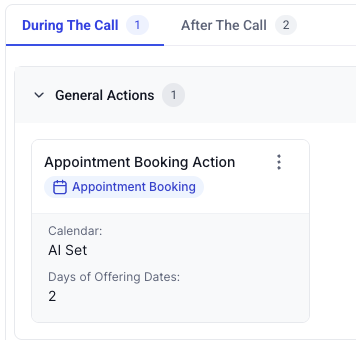
  • Update records during the call
  • Trigger workflows from spoken intent
  • Send follow-up messages and internal tasks after the call
Click to expand preview →
AI appointment booking screenshot
Voice AI Booking

Book appointments during the voice call

The AI can move the customer into an appointment without forcing them out into a separate scheduling step.

  • Offer times while the caller is engaged
  • Store the booking on the contact record
  • Trigger confirmation and reminder workflows automatically
Click to expand preview →
SMS / Chat / Conversation AI

Guide customers through real processes across messaging channels.

Conversation AI works across website chat, SMS, WhatsApp, and Facebook Messenger so the same system can qualify, guide, schedule, and trigger the next action.

Bots can guide the conversation, collect data, and trigger real system actions while the customer is still engaged.
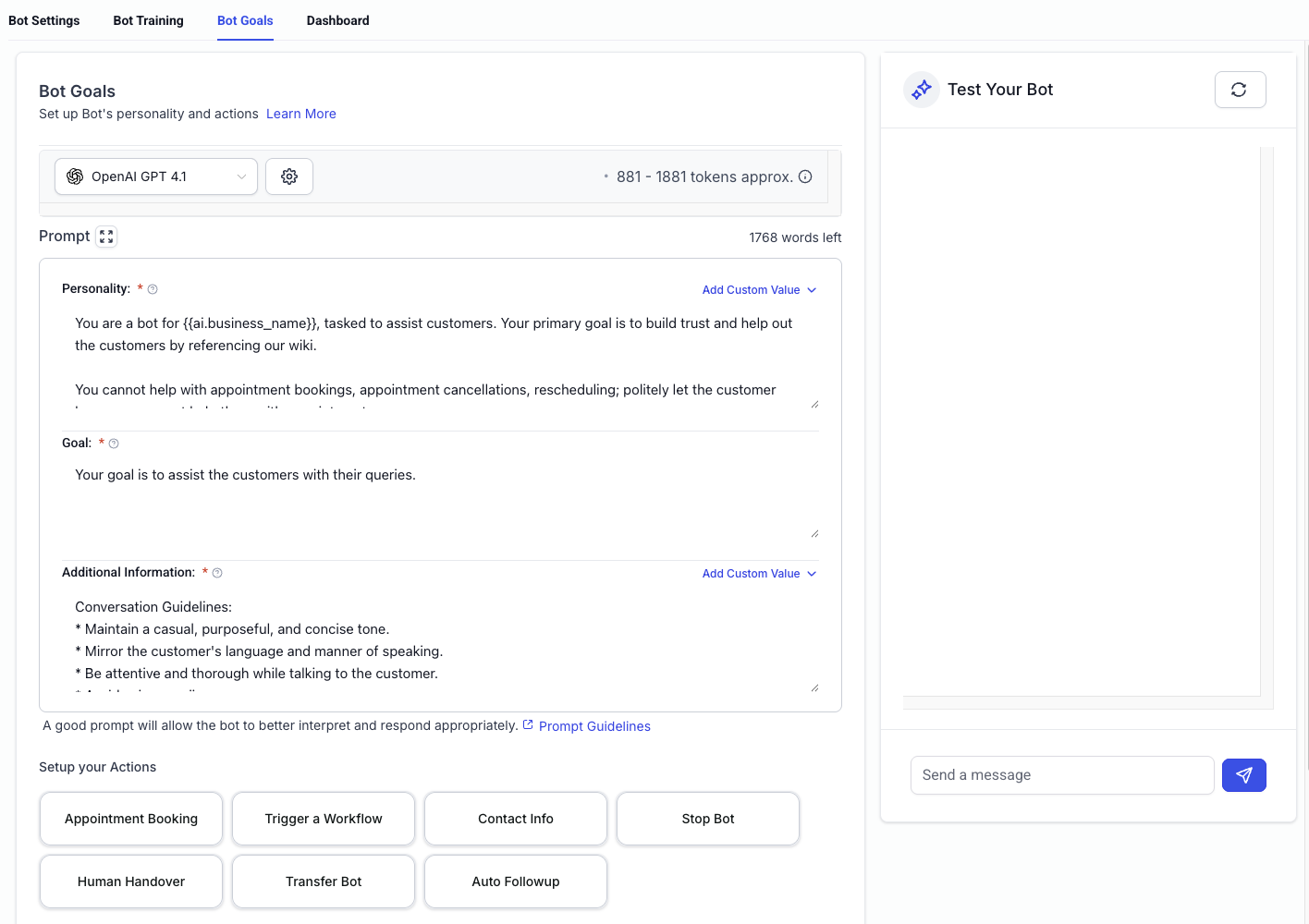
Conversation AI bot screenshot
Conversation Bots

Build conversational AI bots that can follow a script

These bots are made to move a customer through a process instead of stopping at a one-line response.
  • Use chat, SMS, WhatsApp, and Facebook Messenger in the same system
  • Keep structure while responding to live customer context
  • Support intake, qualification, scheduling, and guided conversations
Click to expand preview →
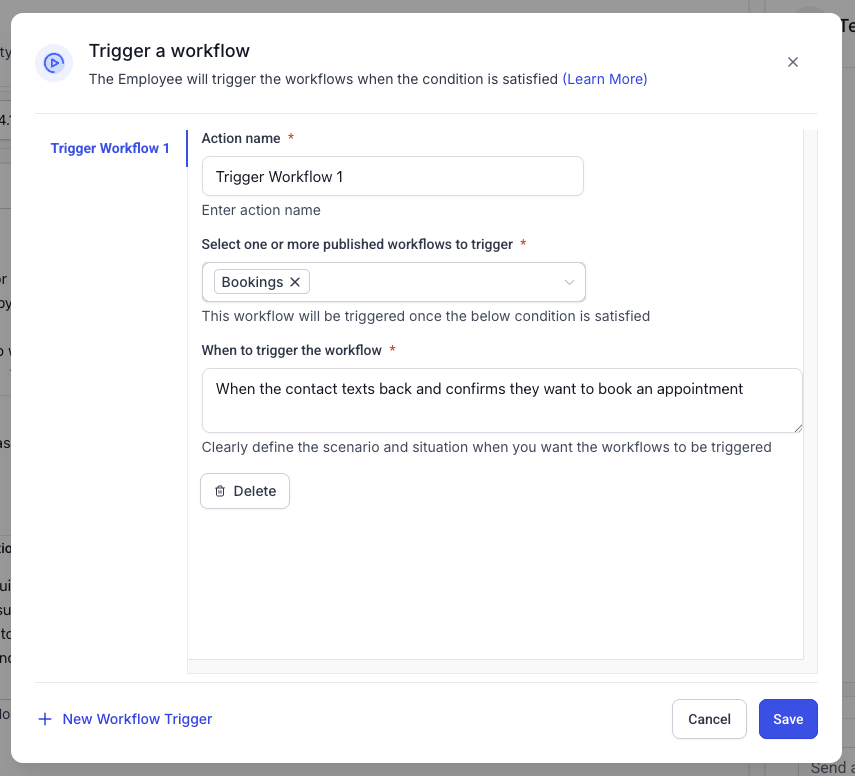
Conversation AI action screenshot
Bot Actions

Execute workflows, send messages, and update data during the chat

The bot is connected to the rest of the CRM, so it can do more than reply. It can act.

  • Trigger workflows during the conversation
  • Send text and email directly from the bot flow
  • Update contact information as answers are collected
Click to expand preview →
AI Agents

Create AI employees that can produce real operational output.

These agents can search the web, generate text, image, video, and audio, call APIs, and interact with your CRM account's MCP-connected systems.

These agents are built for research, generation, system actions, and connected operational work.
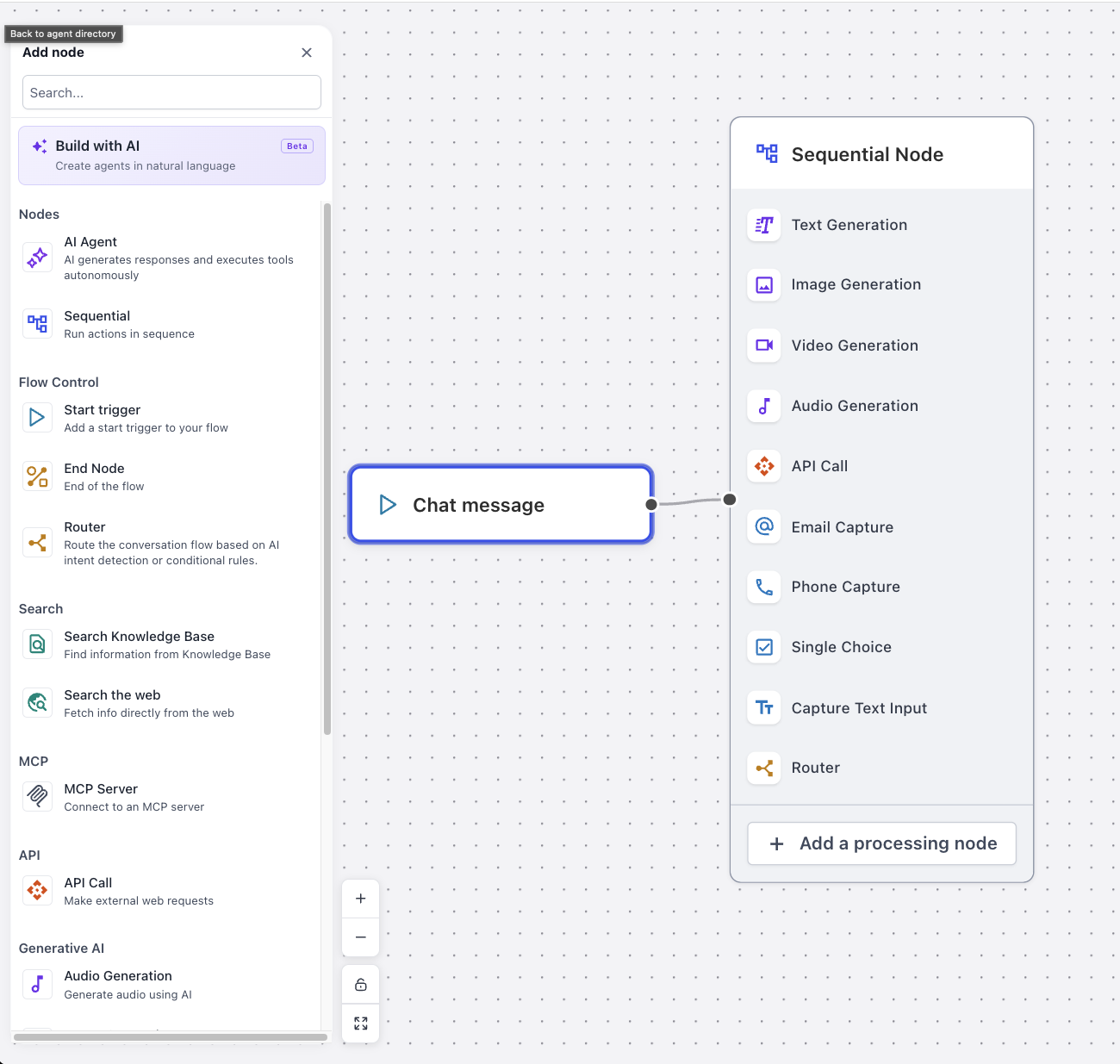
AI agent console screenshot
AI Agent Console

AI agent employees with research, generation, APIs, and CRM access

Use AI for task execution, reporting, media generation, data updates, and connected business logic instead of isolated prompt work.

  • Search the web and report results back to the system
  • Generate image, video, text, and audio assets
  • Read and write data with connected CRM and MCP access
Click to expand preview →
Merchant Payments Integration

Keep payments, estimates, invoices, and subscriptions inside the same system.

Billing should stay attached to the contact, the workflow, and the operational record instead of being treated like a disconnected financial sidecar.

Estimates, invoices, subscriptions, and payment collection stay tied to the contact and the workflow that created them.
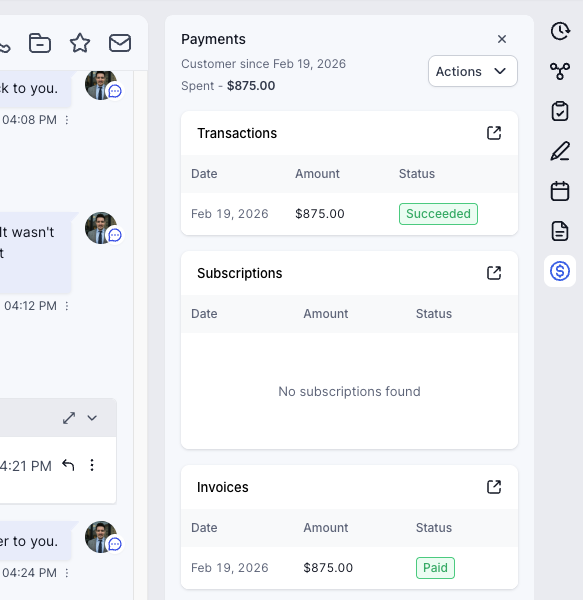
Merchant payments integration screenshot
Payments Integration

Integrated payments with major providers

Use the provider stack that fits your business while keeping collection and billing tied to the CRM record.

  • Support major payment providers and flexible merchant flows
  • Send payment links, estimates, invoices, and subscriptions from one stack
  • Keep revenue events connected to the customer timeline
Click to expand preview →
Web Phone, App Phone

Run calling, numbers, scripts, and routing from the same platform.

The built-in phone system supports both guided rep workflows and higher-volume outbound motion while keeping logs, numbers, and routing close to the CRM.

Calling, scripts, number management, and routing stay in the same operating layer as the CRM.
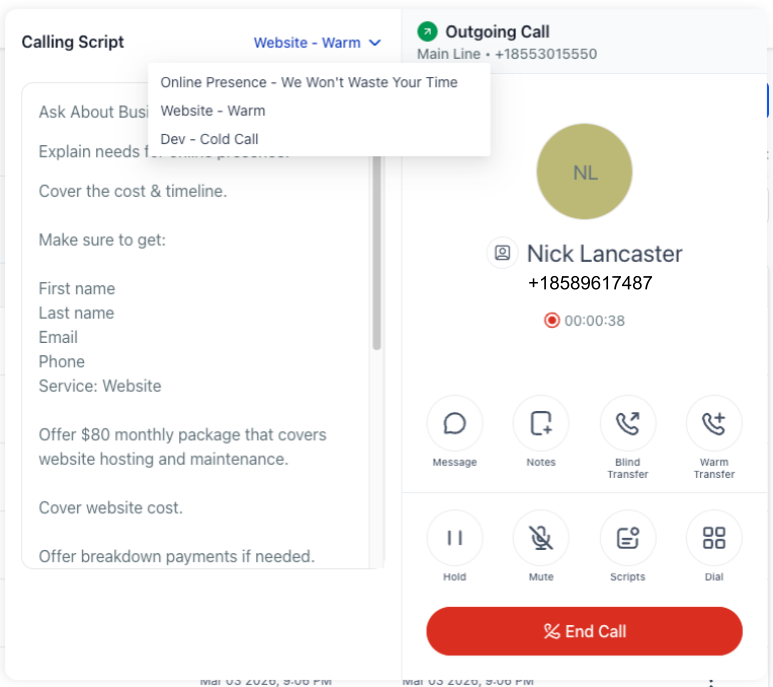
Phone script and calls log screenshot
Scripts + Calls Log

Pre-built scripts and calls log for rep guidance and review

Give the rep live call guidance while keeping completed call records visible for the next step.
  • Use pre-built scripts to guide calls
  • Review logged calls and outcomes in the same environment
  • Tie phone history back to the contact and process
Click to expand preview →
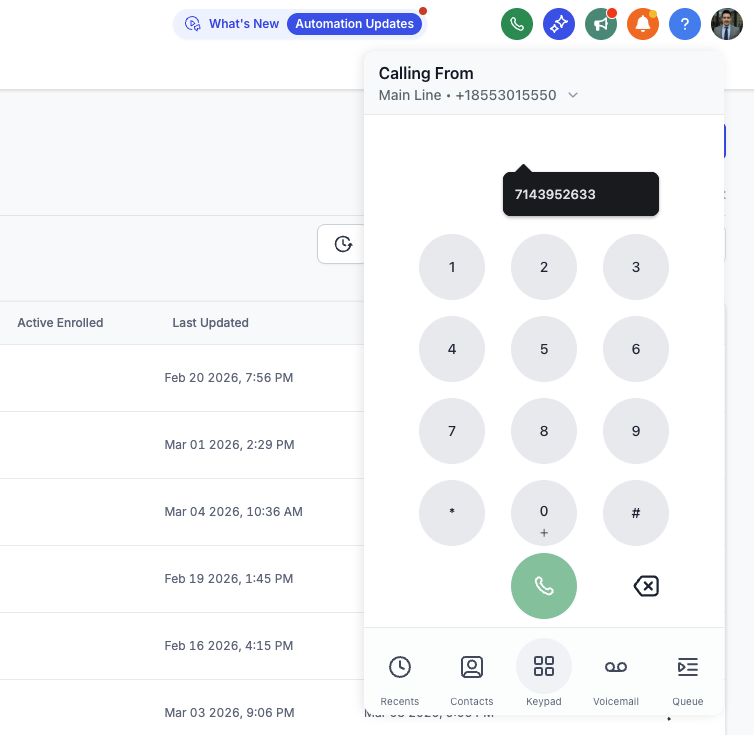
Dial pad and power dialer screenshot
Dialer + Power Dialer

Dial pad and power dialer for outbound motion

Whether it is a direct follow-up call or a higher-velocity list-driven sequence, the phone tools stay ready inside the app.
  • Use the dial pad for direct outbound calling
  • Use the power dialer for faster queue-based outreach
  • Keep activity logged to the right contact and workflow
Click to expand preview →
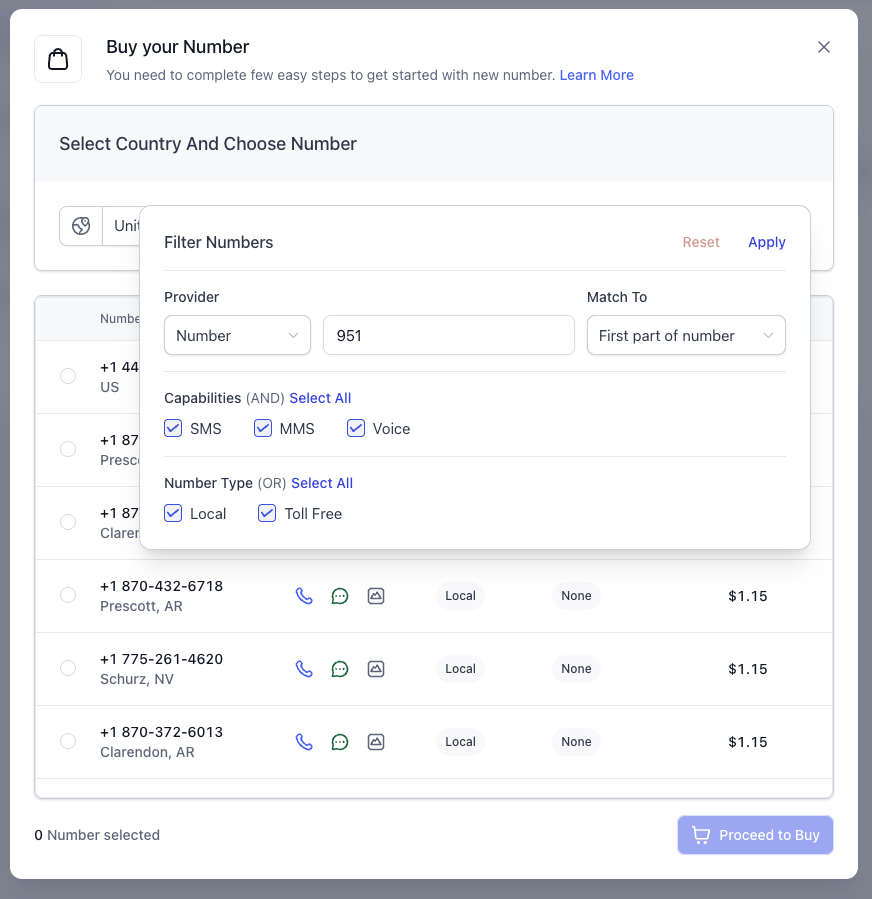
Phone number management and routing screenshot
Numbers + Routing

Carrier number management and phone call routing

Manage numbers and call routing logic in the same system where your reps, AI, and workflows already live.

  • Handle built-in phone number management
  • Support ring-all, round-robin, and route-based behavior
  • Keep routing logic aligned with the rest of the operation
Click to expand preview →
Custom Dashboards

Shape the reporting view around the exact way your company works.

Dashboard templates can be saved and reused, but the real value is deciding which widgets belong together and which filters define the data view.

Each team can get its own reporting view with the exact widgets and filters needed for that role.
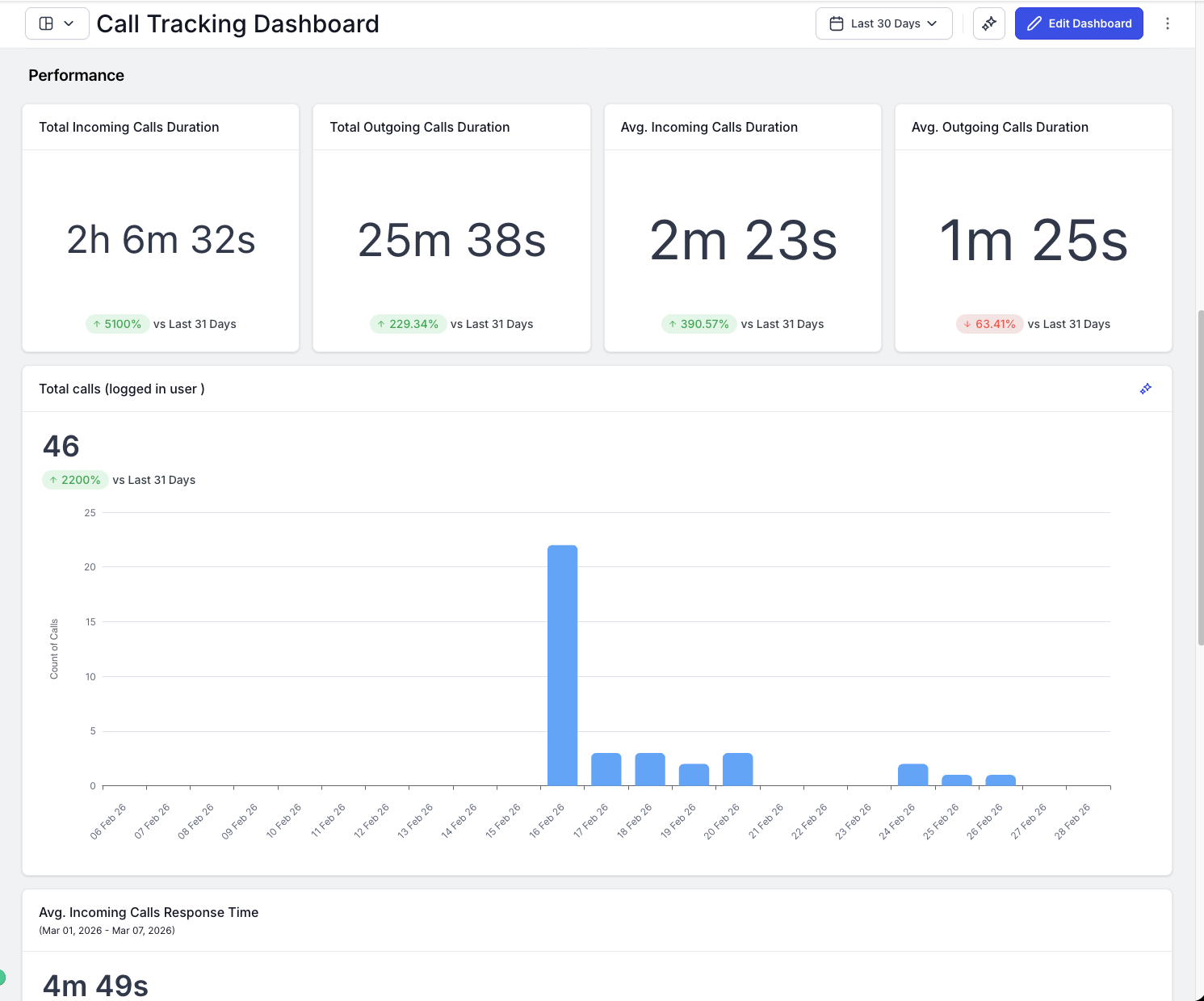
Custom dashboard builder screenshot
Dashboard Builder

Custom built dashboard templates with widgets and saved filters

Create presets for owners, sales teams, service teams, collections, and operational visibility using the same underlying data stack.

  • Choose the widgets that belong in each view
  • Set filters for the exact data slice you want
  • Save the result as a reusable dashboard preset
Click to expand preview →
CRM Integrated Chat Widget

Turn the website into a live communication channel wired into the CRM.

The chat widget pushes customer communication directly into the contact file so chat, call, text, workflow, and follow-up do not split into separate systems.

The website widget pushes incoming conversations straight into the CRM so follow-up starts with context, not guesswork.
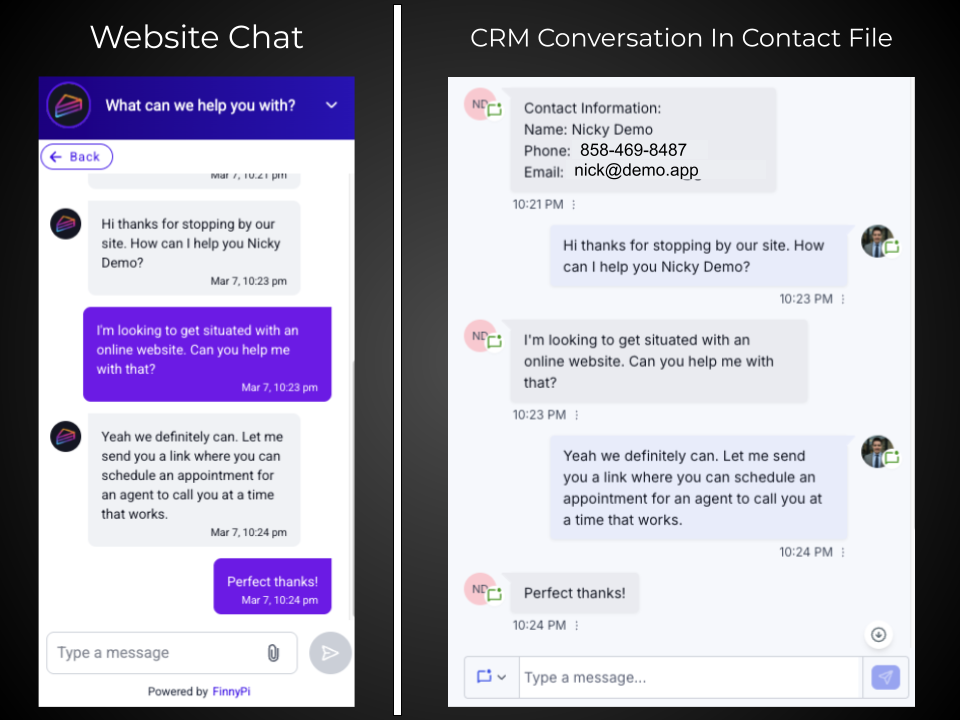
CRM integrated chat widget screenshot
Chat Widget

Chat, call, and text with customers directly from the site into the contact file

Keep all communication tied to one operating record so the conversation never loses context when it moves from the website into the CRM.

  • Create contacts automatically from chat interactions
  • Isolate customer communication into one operating location
  • Move directly from the widget into follow-up and workflow actions
Click to expand preview →
Ready to Move

If you want the CRM, the website, the automation, and the technical execution handled under one roof, this is the next move.

We can launch the CRM, build the website or app around it, wire the automation and AI, and keep the stack moving after launch.